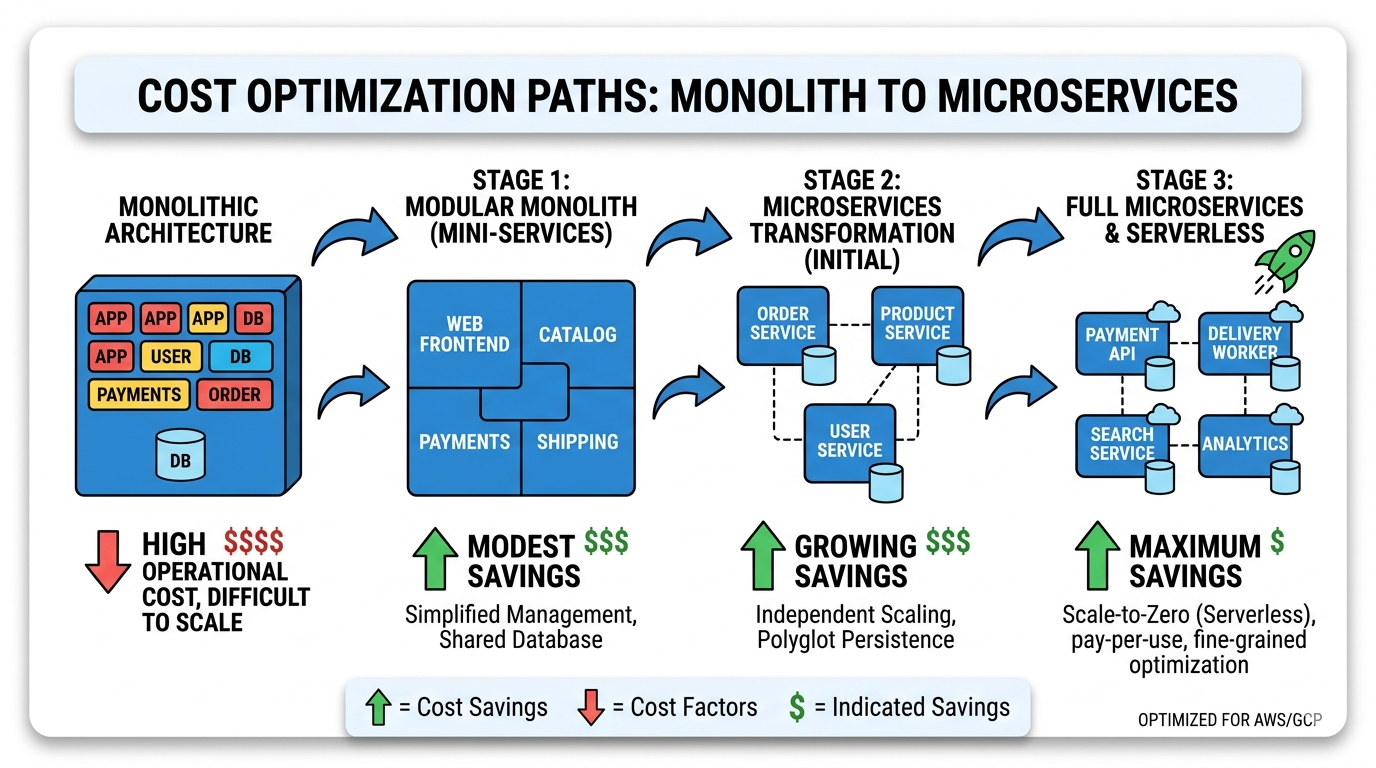
Cost-Efficient System Design: How Startups Can Reduce Software Infrastructure Costs
Startups often fail not because they lack users but because their software infrastructure becomes too expensive to maintain. This is the hidden killer of promising ventures, the silent drain that turns profitable unit economics into impossible math. I have watched dozens of African startups burn through investor capital not on customer acquisition or product development, but on cloud bills that could have been avoided with smarter architectural decisions.
Many developers copy architectures used by large technology companies such as Netflix, Uber, or Amazon. They attend tech conferences where engineering leaders from these giants present their sophisticated distributed systems, then return to their startups and attempt to replicate what they learned. Those companies operate at massive scale, serving billions of requests and millions of concurrent users. Most startups only serve a small number of users, perhaps hundreds or thousands, yet they carry the infrastructure burden designed for enterprises serving billions.
The smartest approach is to design systems that minimize infrastructure costs while remaining scalable. This means building for today’s reality while creating pathways to tomorrow’s growth. It means understanding that premature optimization is not just wasteful but dangerous, consuming resources that should be directed toward finding product-market fit. It means recognizing that the cheapest architecture is the one you do not have to pay for until you need it.
This guide explores the principles, patterns, and practical strategies for cost-efficient system design. We will examine why startups overspend, how to think differently about infrastructure, and specific techniques for reducing costs without sacrificing scalability. We will look at real-world examples, analyze trade-offs, and provide actionable advice you can implement starting today.
The Infrastructure Cost Crisis Facing Startups
The cloud promised democratization of infrastructure, allowing any startup to access the same computing resources as the world’s largest companies. In many ways, it delivered on that promise. A developer with a credit card can spin up servers, databases, and load balancers that would have required millions in capital expenditure just a decade ago. But this accessibility created a new problem: the ease of spending masks the true cost of architectural decisions.
Consider a typical startup journey. A founding team builds a minimum viable product using a popular framework. They deploy on a platform like Heroku or use AWS Elastic Beanstalk for simplicity. As users arrive, they add more servers, implement caching, and perhaps introduce a message queue for background jobs. Each step feels natural, each addition justified by growing traffic. But six months later, they receive a cloud bill that exceeds their office rent, their salaries, sometimes their revenue. They look at the dashboard and realize they are paying for resources they do not fully utilize, for services they added in anticipation of growth that has not yet materialized.
The crisis deepens when startups raise funding. Investors expect growth, and growth requires infrastructure. But venture capital creates perverse incentives around spending. Startups burn money to acquire users, then burn more money to serve those users, hoping that economies of scale will eventually make the math work. For some categories, like marketplaces or SaaS with high gross margins, this model can succeed. But for many others, the infrastructure costs become a permanent drag on profitability.
The situation is particularly acute in Africa, where revenue per user is often lower than in developed markets. A US-based SaaS company might charge $50 per month per user, giving them ample room for cloud infrastructure costs. An African fintech might earn $2 per month per user from transaction fees, leaving almost no margin for infrastructure waste. The same architectural choices that work in San Francisco can bankrupt a startup in Lagos.
Why Startups Overpay for Infrastructure
Understanding why startups overpay is the first step toward building cost-efficient systems. The reasons are varied but predictable, rooted in human psychology, industry incentives, and knowledge gaps that affect even experienced engineers.
The Silicon Valley Copycat Trap
The most common mistake is copying architectures designed for hyperscale companies without understanding the context behind those designs. Engineers read blog posts about how Netflix manages its streaming infrastructure or how Uber handles ride matching at global scale. They absorb these patterns and apply them to startups serving a few thousand users.
What these blog posts rarely mention is that those architectures emerged from years of evolution, driven by specific problems that only appear at massive scale. Netflix did not start with microservices and chaos engineering. They began as a DVD rental service with a monolithic application. Uber’s early architecture was simple enough to run on a few servers. The complexity came later, forced by growth that most startups will never experience.
When a startup copies these patterns prematurely, they inherit complexity without the problems that complexity solves. They pay for Kubernetes clusters when a single server would suffice. They build event-driven microservices when a monolithic application would be simpler and faster. They implement sophisticated caching strategies before they have enough traffic to benefit from caching. Each decision adds cost, complexity, and cognitive load without delivering proportional value.
The Resume-Driven Development Problem
Engineers want to work with interesting technologies. This is natural and healthy, but it creates misalignment between what is best for the startup and what is most appealing to the engineering team. A developer might advocate for using a new database technology because it looks good on their resume, even though a simpler solution would work perfectly well.
This dynamic plays out constantly in early-stage startups. The engineering team, often young and eager to build their skills, pushes for the latest tools and frameworks. They argue that these choices will attract talent, improve developer experience, or prepare the system for future scale. The founders, lacking technical expertise, defer to their engineers’ recommendations. The result is a technology stack that would impress at a meetup but drains the bank account.
Resume-driven development is not malicious. Engineers genuinely believe they are making good choices based on what they have learned from industry thought leaders. But the incentives are misaligned. The engineer benefits from learning Kubernetes even if the startup does not need it. The startup pays the cost, both in immediate cloud spending and ongoing operational complexity.
Premature Scaling and Anticipatory Architecture
Startups operate under tremendous pressure to grow. Investors demand traction, competitors move fast, and the window of opportunity feels narrow. This pressure leads to anticipatory architecture: building for the scale you hope to achieve rather than the scale you actually have.
A startup with one hundred users might build a system capable of handling one million, believing this is prudent preparation for growth. They implement sharding, replication, and distributed caching before they have enough data to justify any of it. They design for scale they may never reach, spending thousands of dollars per month on capacity that sits idle.
The irony is that this approach often makes it harder to achieve the growth they seek. The complexity of the system slows development, making it harder to iterate based on user feedback. The high infrastructure costs reduce runway, forcing earlier fundraising or more aggressive monetization. The team spends time managing infrastructure instead of building features users actually want.
Premature scaling is a form of technical debt, but unlike code debt, it carries ongoing carrying costs. You cannot defer payment until later; you pay every month in cloud bills. The system must be redesigned to eliminate waste, a process that itself consumes engineering resources.
Vendor Lock-In and Service Sprawl
Cloud providers make it easy to add services. A few clicks in the AWS console and you have a managed Kafka cluster, a Redis cache, an Elasticsearch domain, and a data warehouse. Each service solves a specific problem, and together they create a sophisticated architecture. They also create vendor lock-in and service sprawl that dramatically increases costs.
Once you commit to a particular cloud provider’s managed services, migration becomes difficult. The codebase develops dependencies on proprietary APIs. The team builds expertise in that ecosystem. The startup becomes locked into not just the cloud provider but the specific services they chose early on.
Service sprawl compounds the problem. Each additional service adds a base cost, often regardless of usage. A Redis cluster might cost $50 per month even if you store only a few megabytes of data. A Kafka cluster might cost hundreds of dollars before processing a single message. These costs accumulate silently, each justified individually but collectively devastating.
Ignoring the Economics of Cloud Pricing
Cloud pricing is complex, and most developers do not understand it deeply. They know that compute instances cost money, but they may not understand the nuances of data transfer pricing, the cost differences between storage tiers, or how request pricing affects serverless functions.
This knowledge gap leads to expensive mistakes. A developer might choose a general-purpose instance type when a compute-optimized instance would cost less for their workload. They might store infrequently accessed data in standard storage when infrequent access storage would cost a fraction as much. They might not consider data transfer costs between regions or availability zones, leading to bills that surprise everyone.
The complexity is intentional. Cloud providers benefit when customers do not fully understand pricing. They offer hundreds of instance types, dozens of storage classes, and intricate pricing models that make comparison difficult. Even experienced engineers struggle to optimize costs across the full stack.
The Philosophy of Cost-Efficient Design
Before diving into specific techniques, we need to establish a philosophical foundation for cost-efficient system design. This philosophy shapes every decision, from technology selection to deployment strategy to operational practices.
Start Simple, Scale Later
The most important principle is to start with the simplest possible architecture that meets your current needs. Not the architecture that anticipates future needs, not the architecture that impresses technical co-founders, but the architecture that works today with minimum complexity and cost.
This seems obvious, yet it is violated constantly. Startups build for scale they do not have, for users who have not arrived, for problems that may never materialize. They forget that the vast majority of startups never reach the scale where sophisticated architectures become necessary. They optimize for a future that may never come, sacrificing the present in the process.
Starting simple does not mean building without foresight. It means making architectural choices that preserve options rather than foreclosing them. It means using technologies that allow gradual evolution rather than requiring wholesale replacement. It means recognizing that the best preparation for scale is achieving it, not building for it prematurely.
Pay Only for What You Use
The ideal infrastructure pricing model is one where costs scale linearly with usage and drop to near zero when usage stops. Serverless architectures approximate this model, charging per request, per compute second, or per gigabyte of storage. Traditional server-based models require paying for capacity regardless of utilization.
This principle suggests favoring consumption-based pricing whenever possible. If your workload is variable, serverless functions may cost less than reserved instances. If your storage needs are modest, object storage with per-gigabyte pricing beats provisioned database storage. If your traffic follows daily or weekly patterns, auto-scaling groups can reduce costs during low-usage periods.
The challenge is that consumption-based services often have higher per-unit costs than provisioned alternatives at scale. A serverless function might cost more per compute hour than an equivalent EC2 instance at high utilization. The key is to match the pricing model to your actual usage patterns, not hypothetical future scale.
Defer Complexity Until It Pays for Itself
Complexity has a carrying cost. It requires more skilled engineers, more monitoring, more debugging, more documentation. It slows development and increases the risk of outages. Before introducing complexity, ask whether the benefits outweigh these ongoing costs.
This means deferring complex solutions until the simpler alternatives become genuinely painful. Do not introduce a message queue until you actually need asynchronous processing. Do not split monoliths into microservices until the monolith genuinely hinders development. Do not implement distributed caching until database queries actually slow down.
The right time to add complexity is when the cost of not adding it exceeds the cost of adding it. Until that point, simplicity is the winning strategy. This sounds obvious, but it requires discipline to resist the allure of elegant solutions to problems you do not yet have.
Understand the True Cost of Decisions
Every architectural decision has multiple cost dimensions. There is the direct cost of cloud resources: compute, storage, networking. There is the labor cost of building and maintaining the system. There is the opportunity cost of time spent on infrastructure instead of product features. There is the future cost of migration when assumptions change.
Cost-efficient design requires evaluating all these dimensions, not just the monthly cloud bill. A solution that saves $500 per month in cloud costs but requires an extra week of engineering time each quarter may be a net loss. A solution that costs more in cloud resources but enables faster feature development may be a net win.
This holistic view of cost is rare in early-stage startups. Engineers optimize for technical elegance. Founders optimize for immediate runway. Neither fully accounts for the long-term implications of their choices. The result is suboptimal decisions that compound over time.
Core Strategies for Cost Reduction
With the philosophical foundation established, we can explore specific strategies for reducing infrastructure costs. These strategies range from architectural patterns to operational practices, each addressing a different dimension of the cost problem.
Strategy 1: The Monolith First Approach
Microservices have become the default architectural choice for many startups, driven by industry narratives about scalability and independent deployment. But for the vast majority of early-stage startups, a well-structured monolith is superior in every dimension that matters: cost, simplicity, development speed, and operational burden.
A monolithic application runs in a single process, typically on a single server or a small group of servers behind a load balancer. It uses a single database, shared by all modules. Deployment means updating that one application, not coordinating changes across dozens of services. Monitoring is straightforward because there are fewer moving parts.
Cost comparison for a startup with 10,000 users:
| Architecture | Monthly Compute Cost | Monthly Database Cost | DevOps Hours | Total Monthly Cost |
|---|---|---|---|---|
| Monolith on single server | $50 | $50 | 5 hours | $100 + labor |
| Microservices (5 services) | $250 | $200 | 40 hours | $450 + labor |
| Kubernetes cluster | $300 | $200 | 60 hours | $500 + labor |
| Serverless (API Gateway + Lambda) | $150 | $100 | 10 hours | $250 + labor |
The monolith costs less than half of the serverless option and one-fifth of the Kubernetes option. For a bootstrapped startup, this difference can mean months of additional runway.
The monolith does not preclude future scaling. Many companies have successfully scaled monolithic applications to serve millions of users. Shopify, Basecamp, and Stack Overflow all ran monoliths at massive scale. When the monolith becomes genuinely limiting, you can extract services incrementally, addressing only the bottlenecks that actually constrain growth.
When the monolith makes sense:
- Early-stage startups with fewer than 100,000 users
- Teams of fewer than 10 engineers
- Products with cohesive domain models
- Situations where speed of iteration matters more than independent deployability
- Bootstrapped companies with limited infrastructure budget
When to consider alternatives:
- Teams larger than 20 engineers working on distinct modules
- Genuine need for polyglot persistence (different data stores for different services)
- Regulatory requirements for data isolation
- Extreme scale where different services have different scaling characteristics
Strategy 2: Serverless for Variable Workloads
Serverless computing, exemplified by AWS Lambda, Google Cloud Functions, and Cloudflare Workers, offers near-perfect cost alignment for variable workloads. You pay per invocation and per compute duration, with no cost when functions are idle. For many startup use cases, this is dramatically cheaper than provisioned servers.
Consider a typical SaaS application with usage patterns that follow business hours. Traffic peaks during the day, drops at night, and falls to near zero on weekends. With traditional servers, you pay for capacity sufficient to handle peaks, even during idle periods. With serverless, you pay only for actual usage, capturing the savings from low-traffic periods automatically.
Cost comparison for a variable workload:
| Traffic Pattern | Monthly Requests | Server Cost (provisioned) | Serverless Cost | Savings |
|---|---|---|---|---|
| Peak: 100 req/s, Off-peak: 10 req/s | 10 million | $200 | $80 | 60% |
| Highly variable, long idle periods | 5 million | $150 | $40 | 73% |
| Batch processing, occasional spikes | 2 million | $100 | $25 | 75% |
| New product, unknown traffic | Any | $100 minimum | Usage-based | Variable |
Serverless also eliminates capacity planning. You do not need to guess how many servers you will need or worry about traffic spikes overwhelming your infrastructure. The cloud provider handles scaling automatically, within the limits of concurrency settings and account limits.
Challenges with serverless:
- Cold starts can increase latency for infrequently used functions
- Maximum execution time limits (typically 15 minutes for AWS Lambda)
- Vendor lock-in to cloud provider APIs
- Debugging and monitoring are more complex
- Cost can be unpredictable if usage spikes unexpectedly
Best use cases for serverless:
- APIs with variable or unpredictable traffic
- Scheduled jobs and batch processing
- Event-driven architectures
- Webhooks and integrations
- Prototypes and MVPs
- Products with seasonal or promotional traffic patterns
Strategy 3: Database Optimization
Databases are often the largest infrastructure cost for growing startups. They are also the area where optimization can yield the greatest savings. Understanding database economics and choosing the right data store for each workload is essential for cost efficiency.
Right-sizing database instances: Most startups overprovision databases, choosing instances far larger than needed. A startup with a few gigabytes of data and modest query volume does not need a database with dozens of vCPUs and terabytes of RAM. Starting small and scaling up as needed saves money and reduces the risk of overpaying for unused capacity.
Using read replicas strategically: Read replicas distribute query load but increase cost. For most early-stage startups, a well-tuned primary database handles all traffic without replicas. Add replicas only when read queries genuinely impact write performance, not as a prophylactic measure.
Caching to reduce database load: Caching is often cheaper than database scaling. A Redis cache costing $50 per month can reduce database queries by 90%, potentially avoiding a $500 per month database upgrade. For read-heavy workloads, caching is one of the most cost-effective optimizations available.
Database cost optimization techniques:
| Technique | Description | Potential Savings | Complexity |
|---|---|---|---|
| Right-sizing instances | Choose smallest instance that meets performance needs | 30–50% | Low |
| Reserved instances | Commit to 1–3 years for sustained workloads | 40–60% | Low |
| Storage tiering | Move old data to cheaper storage | Variable | Medium |
| Index optimization | Reduce query time and resource usage | 20–40% | Medium |
| Connection pooling | Reduce overhead from connection churn | 10–20% | Low |
| Archive old data | Remove infrequently accessed data from primary DB | 30–70% | Medium |
| Use Aurora Serverless | For variable database workloads | 40–60% | Medium |
Choosing the right database: The database you choose affects both performance and cost. A relational database like PostgreSQL is appropriate for many workloads, but specialized databases can be more cost-effective for specific use cases. Document databases like MongoDB reduce complexity for hierarchical data. Time-series databases like InfluxDB are optimized for metrics. Key-value stores like DynamoDB provide predictable performance at scale.
The key is matching the database to the workload, not using the same database for everything. A startup might use PostgreSQL for transactional data, Redis for caching, and S3 for archival storage, each optimized for its specific role and cost structure.
Strategy 4: Storage Tiering and Lifecycle Management
Cloud storage costs are deceptively complex. The headline price per gigabyte hides a multitude of costs: request pricing, data transfer, retrieval fees, and minimum storage durations. Understanding these nuances is essential for cost-efficient storage architecture.
Storage classes: Cloud providers offer multiple storage classes with different pricing models. Standard storage costs more but provides low-latency access. Infrequent access storage costs less but charges retrieval fees. Archive storage costs the least but requires hours to retrieve data. Glacier and similar services are designed for data that is rarely accessed.
Storage tiering strategy:
| Data Type | Access Pattern | Recommended Storage Class | Relative Cost |
|---|---|---|---|
| Active user data | Frequent, low latency | Standard | 1x |
| User uploads | Infrequent after initial access | Infrequent Access | 0.5x |
| Backups | Rare (disaster recovery only) | Glacier/Archive | 0.1x |
| Logs | Occasional debugging | Glacier/Archive | 0.1x |
| Old versions | Almost never | Glacier Deep Archive | 0.05x |
Lifecycle policies: Lifecycle policies automatically transition data between storage classes based on age or access patterns. A file might start in standard storage, move to infrequent access after 30 days, and archive to Glacier after 90 days. This automation ensures cost optimization without manual intervention.
Data expiration: Not all data needs to be kept forever. Logs, temporary files, and session data can be deleted after a retention period. Implementing expiration policies reduces storage costs and simplifies compliance with data protection regulations.
Strategy 5: Network Cost Optimization
Network costs are often overlooked until the bill arrives. Data transfer between cloud services, between regions, and to the internet can accumulate surprisingly quickly. Understanding and optimizing network costs is essential for cost efficiency.
Key network cost principles:
- Data transfer within the same availability zone is free
- Data transfer between availability zones incurs charges
- Data transfer between regions is expensive
- Data transfer to the internet is expensive
- Data transfer from cloud to on-premises is free for most providers
Use content delivery networks: CDNs like Cloudflare, AWS CloudFront, and Fastly cache content at edge locations, reducing data transfer from origin servers. For static assets, CDNs can reduce bandwidth costs by 90% or more while improving user experience through lower latency.
Minimize cross-region traffic: Design your architecture to keep traffic within a single region whenever possible. If you must move data between regions, consider whether compression or batching can reduce volume.
Use private networking: For communication between services, use private IP addresses rather than public endpoints. Private traffic often costs less and provides better security.
Compress data: Compression reduces the volume of data transferred, directly reducing network costs. Enable compression for API responses, file transfers, and any other data that moves across network boundaries.
Optimize API designs: Chatty APIs with many small requests incur more network overhead than batch APIs with fewer larger requests. Design APIs to return the data clients need in as few round trips as possible.
Strategy 6: Auto-Scaling and Resource Management
Auto-scaling adjusts resources based on demand, ensuring you do not pay for idle capacity. But auto-scaling requires careful configuration to work effectively. Poorly configured auto-scaling can actually increase costs through thrashing or over-provisioning.
Scaling strategies:
| Strategy | Description | Best For | Cost Efficiency |
|---|---|---|---|
| Reactive scaling | Scale based on metrics like CPU utilization | Predictable workloads | Good |
| Scheduled scaling | Scale at specific times based on known patterns | Business hours traffic | Excellent |
| Predictive scaling | Use ML to predict future demand | Highly variable workloads | Very good |
| Manual scaling | Human decides when to scale | Very small startups | Poor |
Right-sizing instances: Before scaling horizontally, ensure instances are appropriately sized. A larger instance may be more cost-effective than multiple smaller instances, especially for workloads with memory or CPU constraints. Use cloud provider tools like AWS Compute Optimizer to identify right-sizing opportunities.
Using spot instances: Spot instances offer significant discounts (60–90%) in exchange for the possibility of interruption. For fault-tolerant workloads, spot instances can dramatically reduce compute costs. Batch processing, stateless web servers, and development environments are good candidates.
Shutting down non-production environments: Development, staging, and test environments often run 24/7 despite being used only during business hours. Implementing automatic shutdowns during off-hours can reduce these costs by 60–70%. For many startups, this single change saves thousands of dollars per year.
Strategy 7: Observability and Cost Monitoring
You cannot optimize what you do not measure. Implementing comprehensive observability for infrastructure costs is essential for identifying waste and validating optimization efforts.
Key metrics to track:
- Cost per user or per transaction
- Cost by service or component
- Underutilized resources
- Data transfer patterns
- Storage growth rates
- Database query costs
Tools for cost monitoring:
| Tool | Purpose | Cost | Complexity |
|---|---|---|---|
| AWS Cost Explorer | AWS cost analysis | Free | Low |
| CloudHealth | Multi-cloud cost management | Paid | Medium |
| Vantage | Cloud cost optimization | Freemium | Low |
| Infracost | Infrastructure as code cost estimation | Free/Paid | Medium |
| OpenCost | Kubernetes cost monitoring | Open source | High |
Setting budgets and alerts: Configure budgets and alerts to notify you when costs exceed thresholds. Early warning allows investigation before costs spiral. Set alerts at 50%, 80%, and 100% of budget to provide escalating awareness.
Regular cost reviews: Schedule monthly cost reviews as part of your operational routine. Review trends, identify anomalies, and plan optimizations. Make cost efficiency a standing agenda item for engineering meetings.
Flow Diagrams: Visualizing Cost-Efficient Architectures
Diagrams help visualize the architectural patterns that reduce costs. The following diagrams illustrate different approaches to cost-efficient system design, each appropriate for different stages and contexts.
Cost-Efficient Startup Architecture
This architecture reduces costs by storing frequently accessed data locally on the client, using serverless computing for backend operations, and leveraging a CDN for static delivery. Together, these choices eliminate the need for large always-on servers and keep the cloud bill proportional to actual usage.
Why this saves money:
By caching data on the client device, the application reduces server requests and database load dramatically. For read-heavy applications, client-side caching alone can cut server costs by 70% or more. Serverless functions execute only when needed, meaning the startup pays nothing during idle periods. The CDN absorbs the majority of static file delivery, keeping origin bandwidth costs minimal.
Offline-First System Design
Offline-first architecture is particularly relevant for African markets where internet connectivity is intermittent or expensive. By designing applications to work offline and synchronizing when connectivity is available, startups can serve users effectively while minimizing infrastructure costs.
Why this saves money:
Offline-first systems reduce infrastructure costs through multiple mechanisms. By processing data locally and synchronizing in batches, they dramatically reduce the number of server requests. A single sync operation might replace hundreds of individual API calls, slashing both compute and database costs. Synchronization payloads can be compressed and delta-encoded, transferring only changed data rather than full datasets. Because much of the real processing happens on client devices, the server only needs to handle sync and conflict resolution, not real-time operations for every user action. This allows the same infrastructure to serve far more concurrent users.
Startup Monolith Architecture
The monolith remains the most cost-effective architecture for early-stage startups. All modules share a single codebase and database, eliminating inter-service network overhead, complex deployment pipelines, and the operational burden of managing many independent services.
Benefits:
A monolithic application deploys as a single unit with no coordination challenges between services, no version compatibility matrix, and no complex deployment pipelines. With a shared codebase and shared database, the monolith requires fewer servers and less networking than distributed alternatives. A monolith serving thousands of users might run comfortably on two small servers, where a microservices equivalent might need a dozen. Developers can work across the entire application without context switching, features that span multiple modules land in a single pull request, and debugging is simpler because there are fewer moving parts.
The $10 Startup Architecture
By combining free tiers, generous always-free allowances, and serverless services, a startup can run a production application for under $10 per month during its earliest growth stage. This architecture validates ideas without burning runway on cloud bills.
Service breakdown:
Static hosting on GitHub Pages, Netlify, or Vercel is completely free and handles frontend delivery for any single-page application. Cloudflare’s free tier provides CDN, DDoS protection, and SSL with no traffic limits. AWS Lambda’s free tier covers one million requests per month, sufficient for thousands of active users. DynamoDB’s always-free tier provides 25 GB of storage and enough read/write capacity for modest workloads. S3’s free tier offers 5 GB of object storage for user uploads and application assets during the first year.
Combine these strategically and a startup can launch, onboard real users, and iterate on their product for months before their cloud bill becomes meaningful.
Large-Scale Microservices: A Cautionary Reference
This diagram illustrates microservices complexity. It is included not as a recommendation for startups, but as a visual illustration of why most early-stage teams should avoid this pattern until it is genuinely necessary.
Important note:
Microservices provide genuine benefits at scale: independent deployability, technology diversity, organizational alignment, and fault isolation. But these benefits come at substantial cost. Each service requires its own compute resources, often with redundancy. A startup with five microservices might need 10–15 servers where a monolith needs 2–3. Each service needs its own deployment pipeline, monitoring, logging, and alerting. Each typically has its own database, creating data consistency challenges requiring complex transaction patterns. For startups, this architecture is often unnecessarily expensive early on. The benefits do not justify the costs until the organization reaches significant scale, typically hundreds of thousands of users and dozens of engineers.
Real-World Case Studies
Theory is useful, but examples from actual startups illustrate how cost-efficient design principles play out in practice. These case studies show both successes and failures, highlighting the impact of architectural decisions on startup survival.
Case Study 1: The Fintech That Almost Died from Database Costs
A Nigerian fintech startup launched with ambitious plans to serve millions of users. They built on a sophisticated stack: Kubernetes for orchestration, multiple microservices, and a managed Cassandra cluster for scalability. The founding team came from large tech companies and designed the system they knew, not the system they needed.
After six months, they had 5,000 active users and a cloud bill of $8,000 per month. The Cassandra cluster alone cost $3,500, far more than any other expense. Revenue from transaction fees was $2,000 per month. The startup was burning investor capital at an unsustainable rate, with infrastructure consuming nearly all of their operating budget.
The intervention came from a new CTO who insisted on radical simplification. They migrated from Cassandra to PostgreSQL, moving from a multi-node cluster to a single database instance. They consolidated microservices into a monolith, reducing the number of deployed services from twelve to three. They moved development and staging environments to scheduled instances that shut down overnight.
The results were dramatic. Monthly infrastructure costs dropped from $8,000 to $1,200. Performance actually improved because the simpler system had less network overhead and better cache utilization. Development velocity increased because engineers no longer navigated service boundaries for every feature. The startup extended its runway by 18 months, enough time to reach profitability.
Key lessons: Choose databases based on actual needs, not hypothetical scale. Consolidate services until the pain of the monolith exceeds the pain of distribution. Turn off non-production environments when not in use. Match infrastructure investment to revenue, not ambition.
Case Study 2: The SaaS Company That Scaled to 100,000 Users on $500/Month
A Kenyan SaaS startup built a platform for school management. Their customers were private schools across East Africa, each paying $50 per month. The founding team was bootstrapped, meaning every dollar spent on infrastructure was a dollar not available for salaries or marketing.
They made deliberate choices from day one to minimize costs. They built a monolithic Rails application running on a single server. They used PostgreSQL as their primary database, with Redis for caching and background jobs. All static assets were served through Cloudflare’s CDN. Development and staging ran on the same hardware as production, isolated by containers.
As they grew, they optimized relentlessly. They implemented database query optimization before adding indexes, let alone replicas. They used read replicas only when primary database CPU consistently exceeded 70%. They moved infrequently accessed data to cheaper storage. They reserved instances for predictable workloads and used spot instances for batch processing.
When they reached 100,000 users, their infrastructure costs were still under $500 per month. They had never needed to raise venture capital because their margins were healthy from day one. Their simplicity gave them a sustainable business while competitors with more sophisticated architectures burned through funding.
Key lessons: Start with the simplest possible architecture. Optimize incrementally, only when metrics justify it. Use free tiers and CDNs aggressively. Profitability is easier when infrastructure costs are minimal.
Case Study 3: The E-Commerce Platform That Died from Technical Debt
A South African e-commerce platform raised $2 million to build the “Amazon of Africa.” They hired a large engineering team and built a microservices architecture inspired by Netflix tech talks. They had services for products, orders, inventory, payments, shipping, recommendations, and reviews. Each service had its own database, its own deployment pipeline, and its own team.
After 18 months, they had spent $1.2 million on engineering salaries and $300,000 on cloud infrastructure. They had launched to market but had only 2,000 active users. The platform was slow and buggy because the distributed architecture introduced latency and consistency problems. Adding new features required coordination across multiple teams and took weeks.
The startup ran out of money before achieving product-market fit. Investors declined to participate in a bridge round, citing poor unit economics and slow growth. Post-mortem analysis revealed that a simple monolithic application could have been built in three months by a team of three developers, at perhaps $200 per month in infrastructure costs. The startup would have launched 15 months earlier, learned from real user feedback, and iterated toward product-market fit. Instead, they built for scale they never achieved and died from the weight of their own architecture.
Key lessons: Premature distribution is a form of technical debt. Time-to-market matters more than architectural purity. Complex architectures require complex teams. Scale is something you earn, not something you build for.
Learning Resources
Deepening your understanding of cost-efficient system design requires ongoing learning. These resources provide valuable perspectives and practical knowledge.
System Design Basics
This video introduces the fundamentals of system architecture including APIs, load balancers, caching, and scalability strategies. Understanding these basics is essential before diving into cost optimization, as many cost-saving techniques build on foundational architectural patterns.
Monolith vs Microservices
Understanding when to use a monolithic architecture versus microservices is essential for cost-efficient system design. This video explains the trade-offs clearly and helps you make informed decisions about which approach fits your current stage.
Scalable System Design
This video demonstrates how engineers design scalable architectures used in modern applications. Pay attention to the principles that enable scale without excessive cost, and notice where complexity is introduced only when necessary.
Practical Implementation Guide
Theory and case studies provide context, but practical implementation requires actionable steps. This section provides a roadmap for building cost-efficient systems, from initial architecture decisions through ongoing optimization.
Phase 1: Architecture Selection (Days 1–30)
Step 1: Define your constraints. Before choosing technologies, understand your expected user count in the first 6–12 months, your team size and skill set, your infrastructure budget, your performance requirements, and the geographic distribution of your users.
Step 2: Choose the simplest viable architecture. For most startups, this is a monolithic web application with a relational database. For API-only products, consider serverless functions with a managed database. For content-heavy sites, a static site generator with a headless CMS. For mobile-first products, an offline-capable client with a sync API.
Step 3: Select technologies with cost in mind. Favor mature, well-documented technologies over novel ones. Consider managed services that reduce operational overhead. Evaluate free tiers and pricing models before committing. Prefer technologies with gradual scaling paths rather than ones that require wholesale replacement.
Step 4: Design for observability. Build monitoring into your architecture from the start, including log aggregation for debugging, metrics collection for performance, cost tracking by service or feature, and alerts for anomalies.
Phase 2: Initial Implementation (Months 1–3)
Step 1: Build with minimal resources. Start with the smallest database instance that meets your needs, a single application server or minimal serverless configuration, shared environments for development, and a free-tier CDN for static assets.
Step 2: Implement caching early. Client-side caching for API responses, database query caching, object caching with Redis or Memcached, and CDN caching for static assets all reduce load on expensive backend resources.
Step 3: Optimize database access. Write efficient queries with appropriate indexes. Use connection pooling to reduce overhead. Consider read replicas only when metrics justify them. Archive old data to reduce the active dataset size.
Step 4: Monitor everything. Establish baselines and identify issues early by tracking request rates and latencies, monitoring database CPU and connection counts, logging errors and exceptions, and setting up cost alerts.
Phase 3: Growth and Optimization (Months 3–12)
Step 1: Review costs monthly. Analyze cost trends by service, identify underutilized resources, look for unexpected spikes, and plan optimizations for next month.
Step 2: Implement auto-scaling. Configure scale-up thresholds based on actual metrics, set minimum instances to handle baseline traffic, use scheduled scaling for predictable patterns, and test scaling behavior under load.
Step 3: Reserve capacity for stable workloads. For workloads with consistent baseline usage, purchase reserved instances for 1–3 years. Consider savings plans for flexibility. Compute break-even points before committing.
Step 4: Optimize storage. Implement lifecycle policies, move old data to cheaper tiers, delete unnecessary data, and compress data where possible.
Step 5: Evaluate architecture decisions. As you grow, reassess earlier choices. Is the monolith still serving you well? Are there bottlenecks that justify extraction? Do you need specialized databases for specific workloads? Would serverless reduce costs for variable services?
Phase 4: Scale and Sophistication (Year 2+)
Step 1: Incremental service extraction. If the monolith becomes genuinely limiting, extract services one at a time, starting with clear boundaries. Maintain data consistency through careful design. Measure impact before and after extraction.
Step 2: Specialized infrastructure. Add specialized services only when justified: search infrastructure for full-text needs, analytics pipelines for business intelligence, message queues for asynchronous processing, and data warehouses for reporting.
Step 3: Multi-cloud or hybrid strategies. Consider diversification for cost or resilience. Use multiple providers for different workloads. Leverage spot markets across providers. Keep options open to negotiate better pricing.
Step 4: FinOps maturity. Allocate costs to teams or features, implement chargeback or showback models, set efficiency targets and measure progress, and build cost awareness into engineering culture.
Cost Optimization Checklist
Use this checklist to evaluate your current infrastructure and identify optimization opportunities.
Compute Optimization
- Are instances appropriately sized for the workload?
- Are we using spot instances where appropriate?
- Do development environments shut down overnight?
- Is auto-scaling configured correctly?
- Are we using the latest generation instance types?
- Could serverless reduce costs for variable workloads?
- Are we paying for idle resources?
Database Optimization
- Is the database instance appropriately sized?
- Are queries optimized with proper indexes?
- Could read replicas reduce load on the primary?
- Is infrequently accessed data archived?
- Are we using the most cost-effective database type?
- Could caching reduce database load?
- Are reserved instances appropriate for this workload?
Storage Optimization
- Are we using the appropriate storage tier for each dataset?
- Do we have lifecycle policies for data aging?
- Is data compressed where beneficial?
- Are we deleting data that is no longer needed?
- Could object storage replace some database storage?
- Are backups optimized for cost?
Network Optimization
- Is a CDN reducing origin traffic?
- Are we minimizing cross-region data transfer?
- Is data compressed before transfer?
- Are API designs optimized to minimize round trips?
- Are we using private networking where possible?
- Could better caching reduce transfer volume?
Architecture Optimization
- Is the architecture simpler than it needs to be?
- Could a monolith replace microservices?
- Are we paying for complexity we do not need?
- Is the team spending too much time on infrastructure?
- Could managed services reduce operational burden?
- Are there free tiers we could leverage?
Process Optimization
- Do we review costs monthly?
- Are cost alerts configured and monitored?
- Do developers understand cloud pricing?
- Is cost efficiency part of engineering culture?
- Do we have visibility into cost per feature or per user?
- Are we tracking cost trends over time?
The Future of Cost-Efficient System Design
The landscape of infrastructure economics continues to evolve. New technologies, pricing models, and architectural patterns emerge regularly. Understanding these trends helps startups make forward-looking decisions.
The rise of edge computing. Edge computing moves computation closer to users, reducing latency and data transfer costs. Cloudflare Workers, AWS Lambda@Edge, and similar services allow code to run in hundreds of locations worldwide. For startups with global users, edge computing can dramatically reduce infrastructure costs while improving performance.
Infrastructure as code maturation. Tools like Terraform, Pulumi, and AWS CDK have matured significantly, making infrastructure reproducible and auditable. Infrastructure as code enables version control, code review, and automated testing for infrastructure changes, reducing errors and improving efficiency.
FinOps and cloud financial management. FinOps has emerged as a discipline combining finance, operations, and engineering to manage cloud costs. Industry bodies have developed best practices, certification programs, and community resources for cloud financial management. Treat cost optimization as a continuous practice, not a one-time project.
Sustainability and green computing. Infrastructure costs correlate strongly with energy consumption and carbon emissions. As environmental concerns grow, cost-efficient architecture increasingly aligns with sustainable computing. Reducing waste benefits both the bottom line and the planet.
AI and machine learning cost challenges. AI and ML workloads have unique cost characteristics, often requiring specialized hardware like GPUs. For AI startups, consider spot instances for training, serverless inference for variable workloads, and model optimization techniques to reduce computational requirements. Monitor GPU utilization carefully to avoid waste.
Final Thoughts
The goal of good system design is not complexity. It is efficiency and sustainability. Too many startups confuse sophistication with progress, building elaborate architectures that consume resources without delivering proportional value. They forget that every dollar spent on infrastructure is a dollar not available for customer acquisition, product development, or extending runway.
The best startup systems share common characteristics. They start simple, using the smallest and cheapest architecture that meets current needs. They scale gradually, adding complexity only when metrics justify it. They minimize infrastructure costs, leveraging free tiers and optimizing relentlessly. And they align spending with revenue, knowing their unit economics and designing systems that support profitable operation.
By choosing the right architecture early, founders can focus on building products instead of paying expensive cloud bills. They can extend runway, improve margins, and build businesses that thrive without constant infusions of investor capital. In the competitive landscape of African startups, where revenue per user often trails developed markets, cost efficiency is not just an advantage. It is survival.
The architectures shown in this guide, from simple monoliths to serverless stacks, prove that you can build sophisticated products without sophisticated infrastructure costs. Build smart, not expensive. Design for today while preparing for tomorrow. The best system design is the one that lets you sleep at night, knowing your runway is secure and your infrastructure costs are under control.
About the Author

Ssenkima Ashiraf is the Founder and Marketing Director at BuzTip, a platform helping African businesses acquire their first customers online. He has written extensively on digital sustainability, technology economics, and the intersection of community values with business models. His work focuses on helping founders understand the real costs and strategic choices behind the digital products they build.
Ashiraf is a strong advocate for pragmatic, infrastructure-aware digital strategies that prioritize traction over trends. He believes that smart, sustainable growth comes from matching technology choices to real customer behavior and operational realities rather than copying what works elsewhere. He writes regularly about startup strategy, African tech ecosystems, and the economics of digital services in emerging markets.
You can reach him at [email protected] or follow his thoughts on technology and sustainability on Twitter at @ashiraf_buztip.
Join the Conversation
Share this article with someone who needs to read it — founders burning through runway on cloud bills, engineers designing systems for scale that has not arrived, or investors trying to understand why portfolio companies spend so much on infrastructure.
Comment on social media using #CostEfficientDesign to connect with others thinking about these same questions. Share your own experiences, lessons learned, and what has worked for you.
Subscribe to BuzTip for more insights on building digital services that serve African markets effectively. Our newsletter delivers practical advice on startup strategy, technology economics, and sustainable growth directly to your inbox.
Published on 10 March 2026
Copyright 2026 BuzTip. All rights reserved. This article may be shared with attribution but may not be reproduced in full without permission.
Appendix: Cloud Provider Free Tiers (as of 2026)
Understanding free tier offerings helps startups maximize runway.
AWS Free Tier
| Service | Free Tier Offering | Duration |
|---|---|---|
| EC2 | 750 hours/month of t2.micro or t3.micro | 12 months |
| Lambda | 1 million requests/month, 400,000 GB-seconds | Always free |
| S3 | 5 GB storage, 20,000 GET requests | 12 months |
| DynamoDB | 25 GB storage, 25 WCU, 25 RCU | Always free |
| RDS | 750 hours/month of db.t2.micro | 12 months |
| CloudFront | 1 TB data transfer, 10 million requests | 12 months |
| API Gateway | 1 million API calls/month | 12 months |
Google Cloud Free Tier
| Service | Free Tier Offering | Duration |
|---|---|---|
| Compute Engine | 1 f1-micro instance per month | Always free |
| Cloud Functions | 2 million invocations/month | Always free |
| Cloud Storage | 5 GB regional storage | Always free |
| Firestore | 1 GB storage, 50,000 reads/day | Always free |
| Cloud Run | 2 million requests/month | Always free |
| BigQuery | 1 TB query processing/month | Always free |
Cloudflare Free Tier
| Service | Free Tier Offering |
|---|---|
| CDN | Unlimited bandwidth |
| DDoS Protection | Unlimited |
| SSL/TLS | Unlimited certificates |
| Workers | 100,000 requests/day |
| Pages | Unlimited sites, unlimited requests |
| R2 | 10 GB storage |
Vercel Free Tier
| Service | Free Tier Offering |
|---|---|
| Hosting | Unlimited static sites |
| Serverless Functions | 100 GB-hours |
| Bandwidth | 100 GB |
| Builds | 100 minutes/day |
Netlify Free Tier
| Service | Free Tier Offering |
|---|---|
| Hosting | Unlimited sites |
| Bandwidth | 100 GB/month |
| Build minutes | 300 minutes/month |
| Functions | 125,000 requests/month |
Recommended combination: Cloudflare for DNS and CDN, Vercel or Netlify for frontend hosting, AWS Lambda for backend functions, and Supabase or PlanetScale for the database. This stack can serve thousands of users at near-zero cost for the first year.
Glossary of Terms
Auto-scaling: Automatically adjusting compute resources based on demand.
CDN (Content Delivery Network): Geographically distributed servers that deliver content from locations closer to users.
Cold start: The delay when a serverless function is invoked after a period of inactivity.
FinOps: The practice of managing cloud financial operations, combining finance, operations, and engineering.
Infrastructure as Code: Managing infrastructure through machine-readable definition files rather than manual processes.
Latency: The time delay between a request being made and a response being received.
Lifecycle policy: Rules for automatically transitioning data between storage tiers based on age or access patterns.
Load balancer: A system that distributes incoming traffic across multiple servers to prevent any single server from being overwhelmed.
Microservices: An architectural style that structures an application as a collection of loosely coupled, independently deployable services.
Monolith: An application where all functionality is contained within a single codebase and deployment unit.
Reserved instance: A commitment to use a specific instance type for 1–3 years in exchange for significantly discounted pricing.
Serverless: A computing model where the cloud provider manages all server infrastructure and the customer pays only for actual usage.
Spot instance: Unused cloud capacity offered at steep discounts (60–90%), with the caveat that it can be reclaimed with short notice.
Throughput: The rate at which a system processes requests or data over a given period of time.
Vendor lock-in: Dependence on a specific provider’s proprietary services, making migration to alternatives difficult and expensive.
This article is dedicated to every founder who has opened a cloud bill and felt their heart sink. You are not alone, and there is a better way.